









-
 Unlimited Activations
-
 Instant delivery
-
 Free Update

📋 Table of Contents
⚡ 1. Introduction: Revolutionize Your Manual Execution
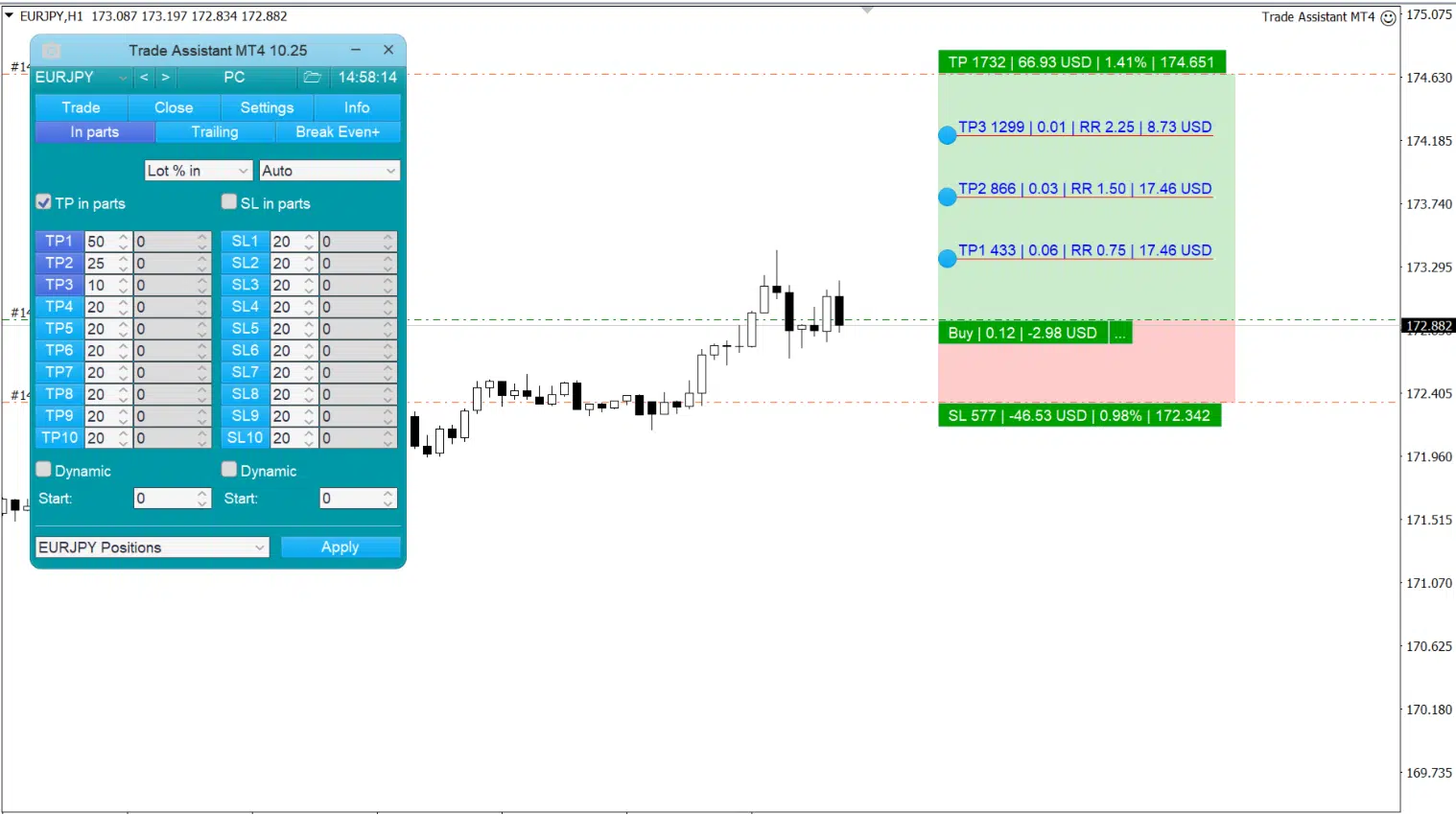
Welcome to the ultimate solution for professional manual traders who require flawless execution and strict mathematical discipline. If you have been searching for an on-chart utility to instantly calculate lot sizes, manage complex exits, and hide your intentions from brokers, your search ends with the Trade Assistant MT4. Built to replace the clunky, outdated default MetaTrader execution window, the Trade Assistant MT4 has been meticulously engineered to run directly on your chart, providing a highly intuitive visual interface for all your trading operations.
Manual trading often falls victim to human error—calculating the exact lot size for a specific 1% risk based on a dynamic stop-loss distance takes time. In volatile markets like Gold or Indices, taking 10 seconds to use a calculator means missing the perfect entry. The Trade Assistant MT4 tackles this challenge by employing an instant, dynamic forex risk calculator. You simply drag the visual lines on your chart to your desired Stop Loss and Take Profit levels, and the tool instantly computes the exact volume required to match your pre-set risk parameters.
What truly sets the Trade Assistant MT4 apart is its incredible post-entry management. Opening a trade is only 10% of the battle; managing the exit determines your profitability. With built-in partial closing, breakeven functions, and 7 different types of trailing stops, this MT4 order management panel molds itself to your exact trading strategy. Whether you are a rapid scalper needing hotkeys or a swing trader setting OCO (One Cancels Other) breakouts, the Trade Assistant MT4 is the ultimate institutional-grade asset for your terminal.
👨💻 2. Developer Information & Credibility
In the world of utility panels and trading tools, efficiency, bug-free coding, and transparency are absolutely critical. The Trade Assistant MT4 was created by Evgeniy Kravchenko (evgen333), a highly respected software engineer in the MQL5 community known for creating practical, trader-focused utilities.
🎯 Complete Documentation and Video Reviews
Unlike vendors who sell complex tools without instructions, the creator of the Trade Assistant MT4 provides exhaustive resources to ensure you master the panel. You can watch a comprehensive breakdown of the tool’s capabilities via the developer’s Official YouTube Video Review.
Furthermore, an in-depth, step-by-step installation and setup guide is publicly available here on the MQL5 blog. This level of transparency guarantees that this manual trading assistant operates exactly as advertised, empowering you to execute your strategies flawlessly in live market conditions.
📊 3. Product Specifications
Before attaching any execution tool to your live account, it is crucial to understand its core specifications. The Trade Assistant MT4 is designed to be lightweight, incredibly fast, and deeply customizable.
| Specification | Detail |
|---|---|
| Product Name | Trade Assistant MT4 |
| Platform Compatibility | MetaTrader 4 (MT4) Only |
| Trading Asset (Pair) | Works on ANY Symbol (Forex, Crypto, Indices, Metals) |
| Recommended Timeframe | Works on ALL Timeframes |
| Primary Function | Trade Execution, Risk Calculation, Order Management |
| Risk Management | Auto-Lot sizing by %, $, Equity, or Free Margin |
| Trailing Stop Options | 7 Types (Pips, Fractals, MA, Parabolic SAR, ATR, Partial, High/Low) |
| Stealth Mode | Virtual Pending Orders, Hidden Stop Loss EA features |
💎 4. Key Features & Risk Management Engine
The overwhelming popularity of the Trade Assistant MT4 is deeply rooted in its visual execution and strict mathematical core. It removes emotion and calculation errors from your trading routine.
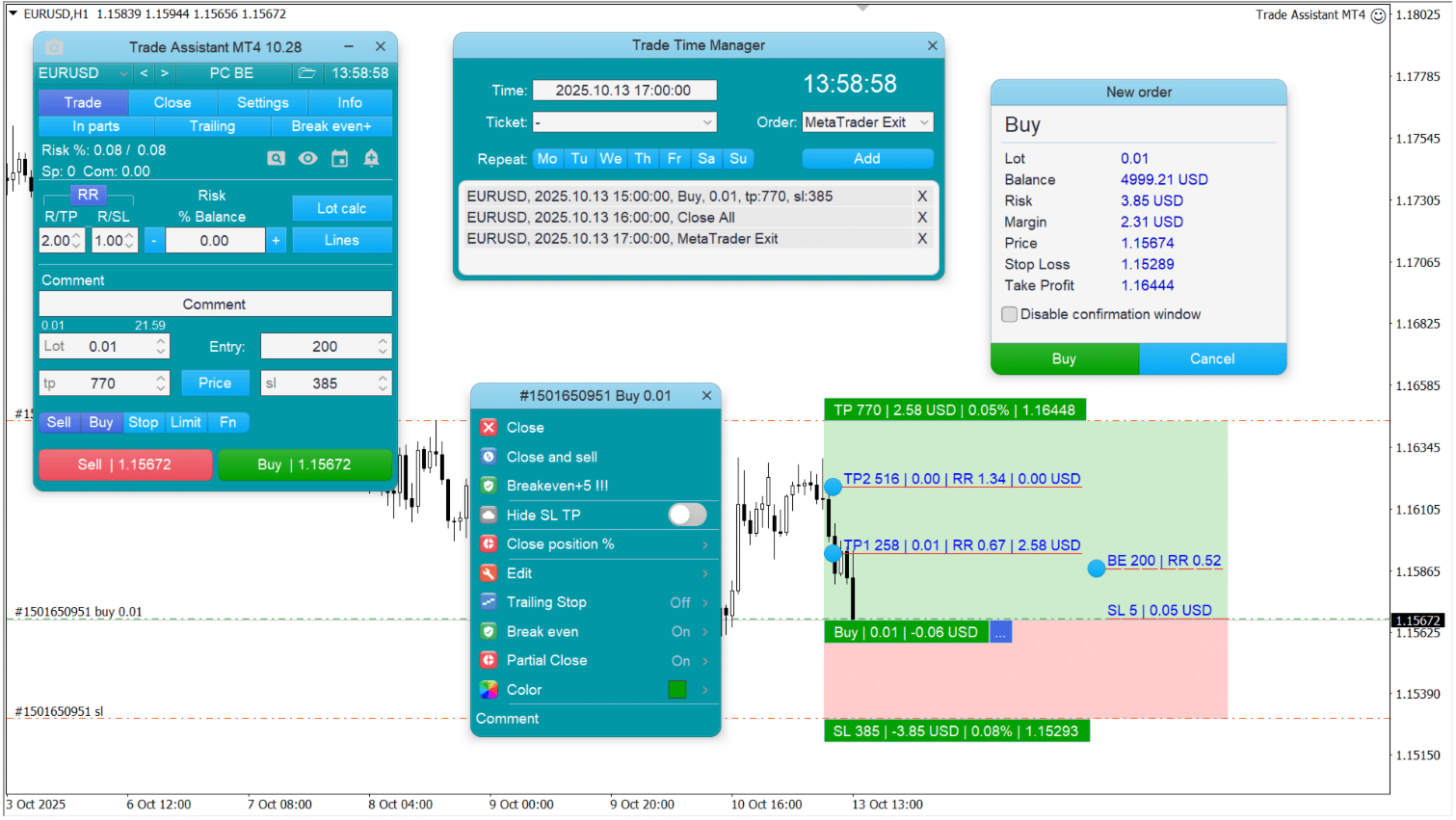
- ✅ Dynamic Line Function (Visual Trading): Stop typing numbers into order boxes. The Trade Assistant MT4 projects an Opening Line, Stop Loss, and Take Profit line directly on your chart. Drag them to your technical levels, and the panel instantly updates your risk parameters before you even click execute!
- ✅ Advanced Risk Management Calculator: Enter your desired risk (e.g., 1% of Balance, or $50), and the panel automatically calculates the exact lot size based on where you dragged your Stop Loss line. It adapts instantly, ensuring you never over-leverage a trade.
- ✅ Auto Risk-to-Reward (RR) Targeting: Use the R/TP and R/SL inputs to lock your risk-to-reward ratios. Set it to 2:1, and when you move your Stop Loss, your Take Profit line will automatically jump to a distance exactly twice as large, ensuring perfect mathematical expectancy.
- ✅ 7 Advanced Trailing Stops: Most platforms only offer a basic point-based trailing stop. The Trade Assistant MT4 provides 7 institutional-grade trailing options, including trailing behind Fractals, Moving Averages, Parabolic SAR, ATR, or previous candle Highs/Lows!
- ✅ Automated Breakeven & Partial Close: Secure your profits effortlessly. Program the Trade Assistant MT4 to automatically move your Stop Loss to breakeven when a certain profit is reached, and automatically close a specific percentage of your lot size at predefined targets.
⚙️ 5. Advanced Order Types & Additional Parameters
Professional trading requires tools that go beyond simple market execution. The Trade Assistant MT4 is packed with stealth and advanced pending order mechanics.
💼 Stealth Execution & Smart Orders
Protect your strategy from stop-loss hunting brokers and manage complex breakout scenarios with ease:
- Virtual Stop Loss & Take Profit: Enable the “Hide SL/TP” function. Your broker will see a trade with NO stop loss, protecting you from malicious price spikes, while the Trade Assistant MT4 holds your true SL/TP invisibly in its memory, executing a market close the millisecond the price crosses your line.
- OCO Orders (One Cancels Other): Crucial for news trading or OCO orders MT4 strategies. Place a Buy Stop and a Sell Stop around a consolidation zone. When one is triggered by the breakout, the Trade Assistant MT4 automatically deletes the other.
- Limit Order Trailing: A highly unique feature that moves your Limit Order dynamically following the current market price at a specified distance, allowing you to catch the absolute perfect retracement entry.
- Trade Time Manager: Set specific times for the panel to automatically open a trade, close all positions, or even shut down the MetaTrader terminal entirely!
⚖️ 6. Pros & Cons Analysis
To provide a completely transparent overview of the Trade Assistant MT4, let’s look at the advantages and the limitations of this highly specialized MT4 trailing stop utility.
| ✅ PROS | ❌ CONS |
|---|---|
|
|
🎯 7. Conclusion & Final Verdict
If you are serious about manual trading, attempting to operate without a tool like the Trade Assistant MT4 is a massive handicap. It is a professionally coded, highly disciplined utility panel that treats risk management and order execution as a precise mathematical science. By allowing you to visually drag your Stop Loss on the chart and having the EA calculate the exact lot size in milliseconds, it completely removes human error and hesitation from your trading psychology.
Whether you are trying to pass a strict prop firm challenge where precise 0.5% risk management is mandatory, or you are managing a personal portfolio that requires advanced partial closing and ATR trailing stops, the Trade Assistant MT4 is an indispensable tool in your arsenal. Stop relying on outdated MT4 order windows and calculator apps; rely on the visually intuitive, feature-packed logic of the Trade Assistant MT4 to execute your strategies flawlessly.
⚠️ 8. Detailed Trading Risk Warning
🚨 IMPORTANT RISK WARNING & DISCLAIMER
READ CAREFULLY BEFORE DEPLOYING:
Trading foreign exchange, commodities, indices, and CFDs on margin carries a substantial risk of loss and may not be suitable for all investors. The high degree of leverage can work against you as well as for you. Before deciding to deploy the Trade Assistant MT4 on a live account, you should carefully consider your investment objectives, available free margin, and experience level.
🔴 MANDATORY TESTING PROTOCOL
YOU MUST:
- Use the Trade Assistant MT4 on a DEMO ACCOUNT first to familiarize yourself with the interface, the visual line dragging, and the hotkey functions.
- Understand that “Virtual / Hidden” Stop Losses are held in the EA’s memory. If your MT4 terminal crashes or your internet connection drops, the broker WILL NOT have a stop loss on file for your trade, exposing you to unlimited risk. Always use a VPS.
- Double-check your Risk Calculation settings (e.g., % of Equity vs. % of Balance) to ensure the generated lot size aligns with your intentions before hitting the Buy/Sell button.
Past performance is not indicative of future results. While the Trade Assistant MT4 utilizes advanced mathematical formulas to size your positions correctly, the possibility exists that you could still sustain a loss due to severe market gaps, slippage, or user input error. The information provided here is for educational and software description purposes only and does not constitute financial advice.
 Recommendations
| Platform | |
|---|---|
| Pair | |
| Timeframe | |
| Preset/Setfile |




Reviews
Clear filtersThere are no reviews yet.